
Images as a building block for your session
Work format: Slide
Slides are useful when you want to combine your presentation with interactive moments in one seamless flow. They help you guide your story, introduce topics, and create natural transitions between content and interaction.
Slides work especially well in sessions where you regularly switch between presenting and engaging your audience.
In QandR, Slides are used to combine your presentation with interactive formats in one seamless flow. Instead of creating slides inside QandR, you upload existing slides as images or a PDF.
Each slide is shown full-screen and helps you guide your story — for example to introduce a topic or structure your session into clear sections. These static slides are alternated with interactive QandR formats, creating a natural rhythm between presenting and engaging your audience.
Slides can also become interactive through Qboard:. Participants can submit questions or comments related to the slide that is currently on screen, without interrupting the session.
In practice, this means you can upload a full presentation and place interactive moments in between, turning a traditional slide deck into an interactive session.
No, QandR is not a slide editor. It is designed to work alongside tools like PowerPoint or Keynote.
You create and design your slides in your preferred presentation software, where you have full control over layout, typography, and visuals. Then you export your slides as a PDF or images and upload them into QandR.
This way, you combine the strengths of both: powerful slide design and interactive group engagement.
It depends on how interactive your session is.
If your session includes frequent moments of interaction, it’s often easier to upload your slides into QandR. This allows you to present and interact within one flow, without switching between tools.
If your presentation consists of many slides with only a few interactive moments, you can also present from your own presentation software and use QandR alongside it.
In practice, both approaches are used — choose what best fits your way of presenting and the level of interaction you want.
A slide can be used to support your session, for example to introduce a topic, guide your story, or create a transition between interactive moments. Using slides is optional — you can also run a session fully interactively without them.
In the project editor, you can easily add a slide. Click the plus (+) button, choose Slide, and upload an image from your computer. This image will be shown full-screen during your session.
Slides in QandR are static images, which means you don’t edit their layout or content inside QandR itself. This keeps the interface simple and ensures that everything works smoothly during your session.
If you want to create a slide with text or visual design, it’s best to use a presentation tool like PowerPoint or Keynote. These tools give you full control over layout, fonts, and styling. Once your slide is ready, export it as an image (JPG or PNG) and upload it to QandR.
You can reorder slides, adjust your session flow, and combine them with interactive formats.
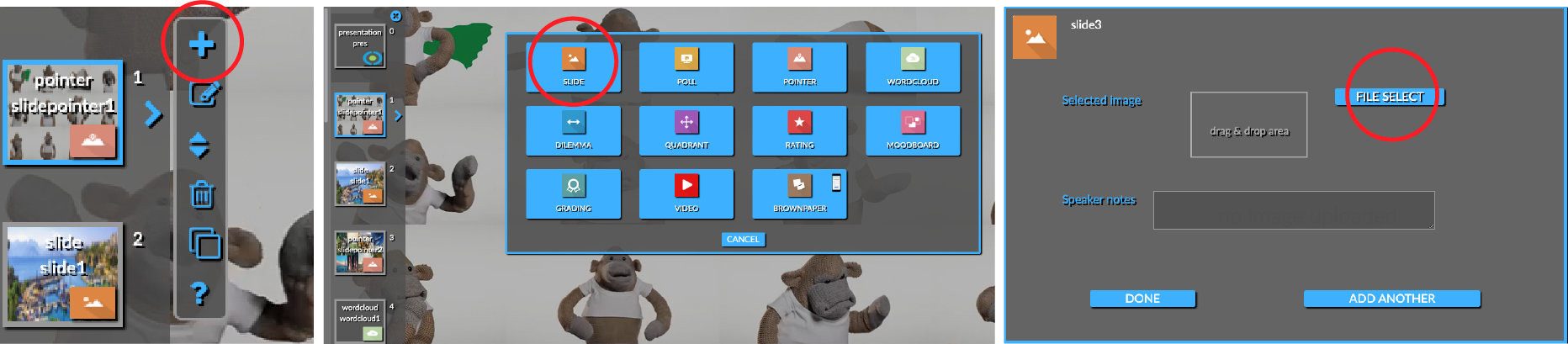
Yes, you can easily import an entire slide deck into QandR.
Export your presentation (for example from PowerPoint or Keynote) as a PDF and upload it in the editor using the “File Select” option. Each page will automatically be converted into a separate slide.
This allows you to quickly turn an existing presentation into a QandR session, without uploading slides one by one. View the page of importing slides for more information and clear instructions for use.
Slides in QandR are static images that you upload via the editor. You can use common formats such as JPG, PNG or PDF.
To ensure your Slides display properly, keep the following in mind:
- Use a 16:9 (landscape) aspect ratio. Other proportions may appear stretched.
- Keep file sizes relatively small (preferably under 1 MB) for fast loading.
- Avoid including privacy-sensitive information, as everything shown is visible to participants.