Import multiple slides
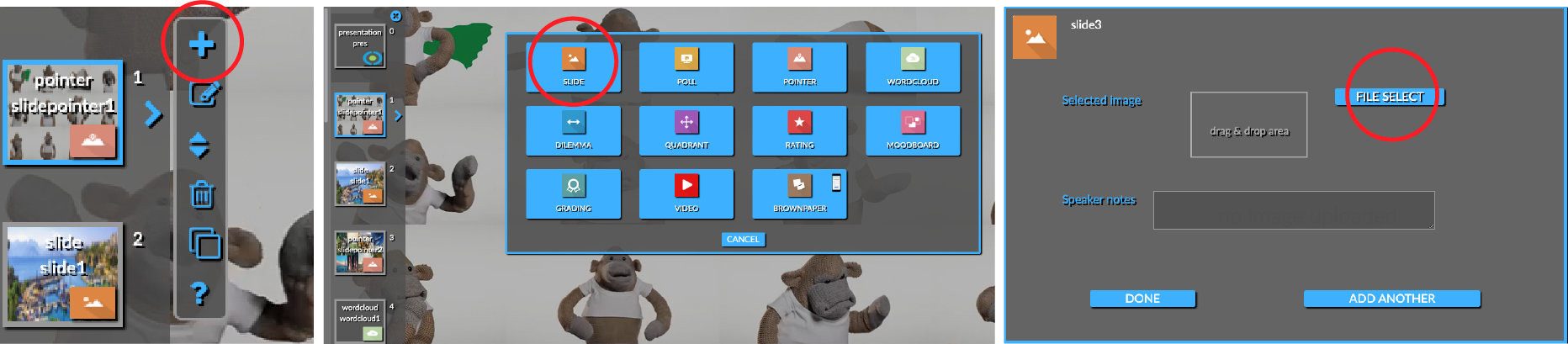
In this video, we show how you quickly add a complete slides deck to QandR. You do this by selecting the slide type in the editor and then importing the slides as a pdf document. So click on 'File Select' and then select the pdf you want to upload. Once you have done this, you will see that multiple slides are inserted in the editor with the image for that page on each slide.
We chose the intermediate PDF format because it is convenient for both PowerPoint and Keynote users. Both programmes have the functionality to export presentation slides as a PDF.
Currently, you can import in QandR a PDF with up to 60 pages and 70 MB. If your presentation contains more then 60 slides, we recommend exporting it in two or more parts of 60 slides each to one PDF. You can then upload these PDF's one after the other.
Read more about QandR's editor on the session editor page. Here you will find more information about how the QandR editor works, how you can structure a QandR and how you can stimulate dialogue.
COMBINE PRESENTATIONS WITH LIVE PARTICIPANT INTERACTION