
Find out which ones suit your needs
Compare all talking boards
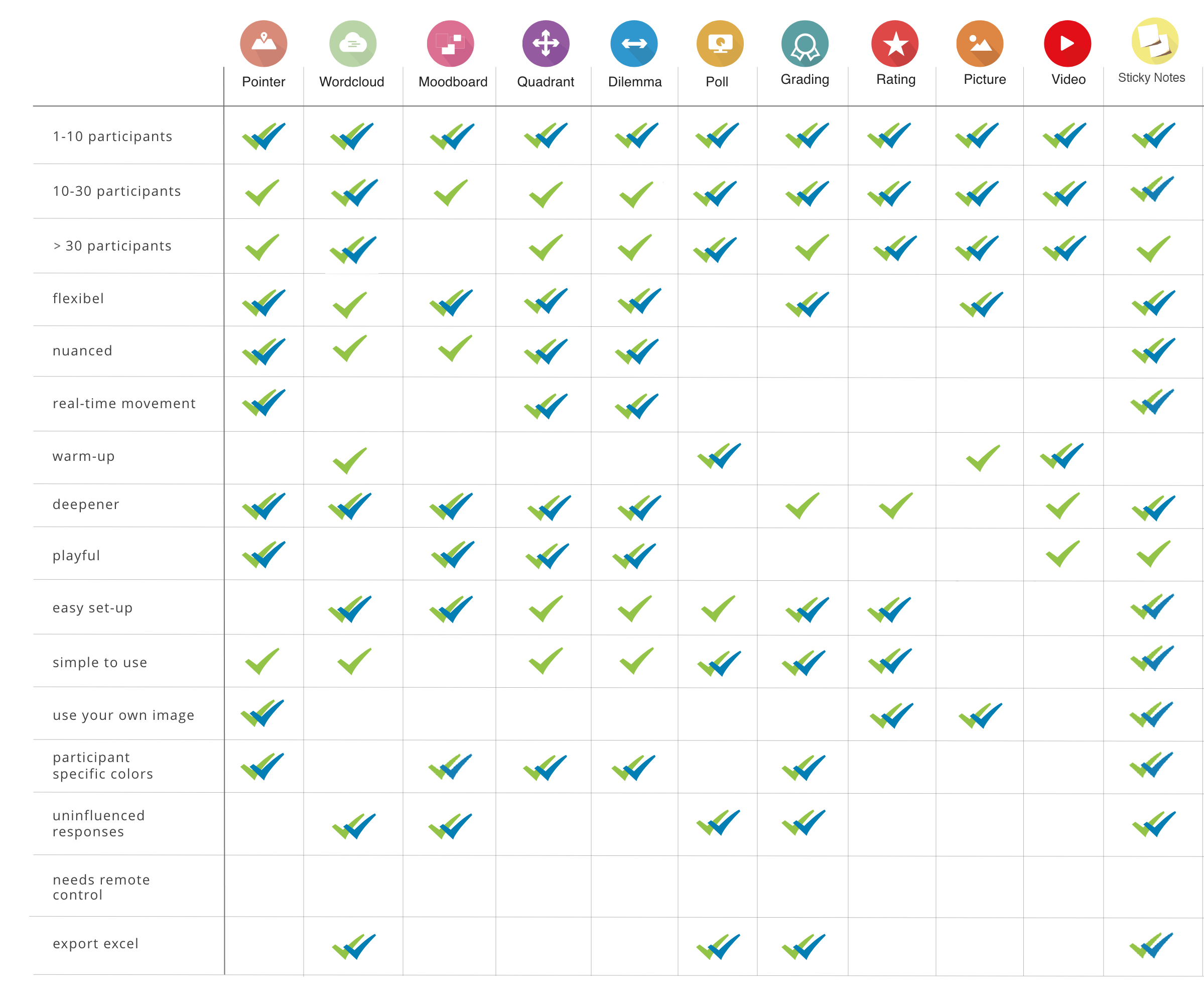 Click here for a summary of all talking boards.
QUESTIONS AND ANSWERS TO HELP YOU GET STARTED QUICKLY
Frequently asked questions about the different interaction formats
A strong session is not about using as many formats as possible, but about creating a logical flow that guides your group through a conversation.
Most sessions follow a natural progression: you start by engaging the group, then explore perspectives, and finally move towards deeper discussion or decision-making.
You can think of your session in three phases:
- Start and activate – Get everyone involved and create energy in the group
- Explore and understand – Make different perspectives visible and build shared understanding
- Deepen and decide – Discuss differences, evaluate options and move towards conclusions
Not every session needs all phases, but thinking in terms of flow helps you create a session that feels natural, structured and engaging.
Not every interaction format serves the same purpose. Some formats help bring energy into the group, while others are better suited for exploring perspectives in more depth, organizing ideas or making decisions together.
Choosing the right format depends on what you want to achieve at that moment in your session:
- To start and activate the group: use formats like Poll or Wordcloud
- To explore perspectives: use Pointer or Moodboard
- To deepen the conversation: use Dilemma, Quadrant or Grading
- To collect and structure ideas: use Sticky Notes
By combining formats, you can guide a group step by step towards a meaningful conversation and a supported outcome.
QandR was originally developed for smaller group settings, such as workshops and focus groups, where there is room for interaction, nuance and conversation.
At the same time, QandR is also widely used during larger meetings, presentations and participation sessions. Which interaction format works best depends on both the size of the group and the type of interaction you want to create.
In larger groups, low-threshold and structured formats often work best. Examples include Poll, WordcloudP, Grading and Qboard. These formats make it easy to collect large amounts of input at the same time and display the results clearly on the main screen.
More visual or open formats such as Pointer, Dilemma, Quadrant, and Sticky Notes often work best in small to medium-sized groups. These settings usually offer more room to discuss responses together, identify patterns and explore topics in greater depth.
In smaller groups, you generally have the most flexibility and can use almost all interaction formats, especially those that encourage conversation, reflection and nuance.
The choice of interaction format therefore depends not only on the number of participants, but also on the level of interaction, depth and structure you want to create in your session.
If you want to add interaction without interrupting the flow of your presentation, Qboard allows participants to submit questions and comments while you continue presenting. Upload your Slides, collect audience reactions, and add interactive moments whenever you want.
This way, you stay in control while actively engaging your audience.
Within trainings, QandR can support formative learning by encouraging participants to share their knowledge, assumptions and questions while receiving direct feedback from the group. This creates natural feedback loops and peer-to-peer learning without increasing the workload of the trainer.
Formats such as Poll can be used to test knowledge with multiple-choice questions, after which answers can immediately be discussed together. Qboard can also be valuable in trainings, for example by allowing participants to submit questions, comments or reflections during presentations without directly interrupting the speaker.
For further exploration, more open and visual formats such as Wordcloud, Sticky Notes, Moodboard, Quadrant and Pointer help participants collectively explore ideas, associations and perspectives.
By working with images, associations and input directly from participants’ camera rolls, conversations become more concrete and engaging. This helps make abstract topics tangible and creates a learning experience that is more active, inclusive and visual than verbal discussion alone.
If you want to quickly energize the group and get everyone involved, choose a low-threshold format. For example, use a Poll to gauge opinions, a Wordcloud to collect spontaneous input, or a Video as a starting point for discussion.
These formats make it easy to participate and immediately increase engagement.
If you want to explore and discuss differences within the group, use formats such as Dilemma or Quadrant can also help to explore feelings and associations.
These formats make differences visible and provide a strong starting point for discussion.
Do you want insight into how participants value or assess an idea, design or proposal? Formats such as Grading, Wordcloud and Sticky Notes are very suitable for this.
With Grading, participants give scores or evaluations. This quickly reveals how the group feels about a topic and where differences in opinion exist. The results provide valuable input for discussion, evaluation and further improvement.
A Wordcloud allows for more open feedback. Participants can, for example, describe what they like, what could be improved or which words they associate with a plan. Responses that are mentioned more often or receive more upvotes appear larger on the screen. This quickly highlights which themes resonate most within the group.
For more in-depth and structured feedback, you can use Sticky Notes. Participants can describe in their own words what they like or dislike about a plan, design or scenario. The facilitator can also upload a custom canvas or background, such as a prioritization matrix, map or framework, on which responses can be collectively placed and discussed. This creates an immediate visual overview of positive aspects, concerns, ideas and points of attention on the shared screen.
When working with input from the group, it’s important to create structure and overview. With Sticky Notes, participants can submit ideas that you can organize together on a shared canvas. With Pointer, you can let participants indicate what matters most to them.
This helps turn input into structure and shared understanding.
Do you want to determine together which topics, ideas or measures are most important? Formats such as Poll, Wordcloud and Sticky Notes are very effective for prioritization and decision-making.
With a Poll participants can, for example, select their personal top 3 from a larger list of options. The shared screen immediately shows the group’s main priorities. This helps create focus and supports collective decision-making.
A Wordcloud allows for more open input. Participants can enter their own words or short responses, for example in answer to the question of what they find important. Others can then upvote these responses, causing the most important themes to appear larger on the screen. This quickly reveals which topics resonate most within the group.
For a more in-depth approach, you can use Sticky Notes together with a prioritization matrix. Participants create their own ideas, actions or solutions and place them collectively into a matrix on the central screen. This not only shows what is considered most important, but also helps explain why certain topics receive priority.