











Shown on main screen, anybody in the group can see it.

Build your story line by adding slides, images or photos to your QandR
Use Slides within QandR to combine interactive formats with visual content. This allows you to create presentations where explanations, visuals and interaction naturally alternate throughout the session.
Slides also work seamlessly together with features such as Qboard, allowing participants to submit questions and reactions during your presentation without interrupting the speaker. This makes Slides especially suitable for interactive presentations, workshops and public participation sessions.
QandR does not contain a traditional slide editor. Instead, you can easily import existing slides, images or visual designs from tools such as PowerPoint or Keynote. This allows you to keep working in your preferred presentation software while benefiting from the interactive capabilities of QandR.
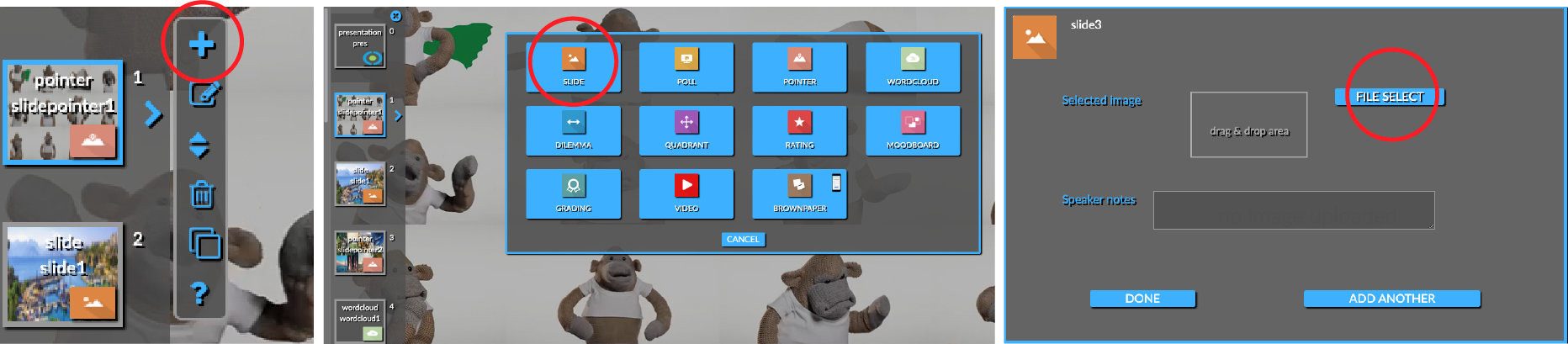
Would you like to import an entire presentation at once? Simply export your presentation as a PDF and upload it to QandR. In the editor, select the Slide type, click File Select, and choose the PDF file you want to import. QandR will automatically convert each page into a separate slide within your session. You can also watch this short video about importing multiple slides at once.
You can also add individual images or photos to further shape your presentation flow. These visuals are displayed fullscreen between interactive modules and are ideal for introductions, visual transitions or a strong conclusion to your session.
Shown on main screen, anybody in the group can see it.
COMBINE PRESENTATIONS WITH LIVE PARTICIPANT INTERACTION